Anúncios
Virtual assistant apps have transformed smartphones into powerful personal helpers, with Alexa leading the charge in voice-powered convenience and smart home integration.


These intelligent companions have evolved far beyond simple voice commands. Today’s virtual assistants manage calendars, control IoT devices, answer complex questions, and even predict your needs before you ask.
Anúncios
The competition between tech giants has driven rapid innovation, making these tools more intuitive and capable with each update.
Understanding which virtual assistant best fits your lifestyle requires looking at features, ecosystem compatibility, and practical applications. Whether you’re team Alexa, Google Assistant, or Siri, each platform offers unique strengths worth exploring in depth.
Anúncios
🎯 What Makes Virtual Assistant Apps Essential in 2024
The modern smartphone user juggles dozens of tasks daily. Virtual assistants act as cognitive extensions, handling routine operations while you focus on higher-priority activities. The hands-free operation alone justifies their existence for drivers, cooks, and busy professionals.
Integration depth separates good assistants from great ones. Alexa’s compatibility with over 100,000 smart home devices creates seamless automation possibilities. You can link thermostats, lights, security cameras, and appliances into unified routines triggered by single voice commands or scheduled events.
Privacy-conscious users appreciate the customizable settings modern apps provide. Most platforms now offer voice history deletion, microphone muting, and granular permission controls. Amazon’s Alexa app includes a dedicated privacy hub where you review and manage all voice recordings.
Core Functions That Define Value
Every virtual assistant handles basic tasks, but execution quality varies significantly:
- Voice recognition accuracy: Google Assistant leads with 95%+ accuracy across accents and dialects
- Natural language processing: Understanding context in multi-turn conversations
- Third-party integrations: Alexa Skills number over 130,000, covering everything from meditation to pizza ordering
- Proactive suggestions: Predictive reminders based on calendar events and location data
- Multi-language support: Real-time translation and bilingual households management
The learning curve differs between platforms. Siri benefits from iOS integration, requiring minimal setup. Alexa demands more initial configuration but rewards users with deeper customization options and cross-device synchronization.
📱 Amazon Alexa: The Smart Home Champion
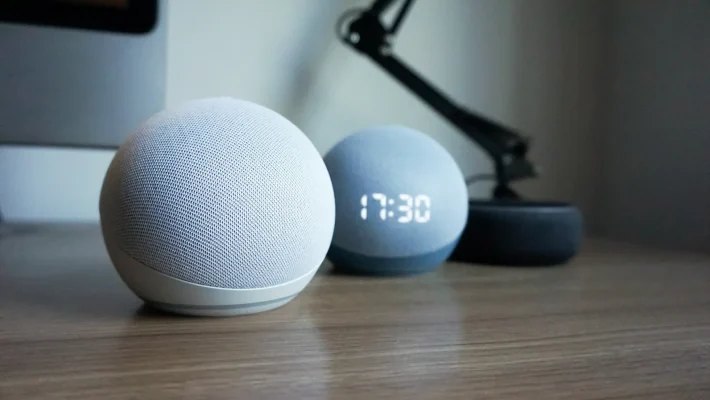
Amazon’s Alexa app serves as command center for Echo devices and third-party Alexa-enabled products. The mobile application extends voice control beyond physical speakers, transforming your phone into a portable Alexa interface.
What distinguishes Alexa from competitors? The Skills ecosystem operates like an app store for voice commands. Developers have created Skills for thousands of services—Spotify playlist curation, Uber rides, news briefings from specific outlets, and meditation guides from Headspace.
Setting Up Alexa for Maximum Efficiency
Initial configuration takes 10-15 minutes but unlocks powerful functionality:
- Link your Amazon account for shopping and Prime features
- Connect streaming services (Spotify, Apple Music, Amazon Music)
- Add smart home devices through the Devices tab
- Enable Skills based on your interests and needs
- Create Routines combining multiple actions into single commands
Routines represent Alexa’s most underutilized feature. A “Good Morning” routine can adjust thermostat temperature, read your calendar, report weather, start coffee maker, and play news briefings—all triggered by one phrase or scheduled time.
The app’s visual interface complements voice interactions. Shopping lists sync across devices, allowing household members to add items via voice while you check them at the grocery store on your phone. Recipe instructions display step-by-step, pausing when you say “Alexa, next step.”
Alexa’s Standout Features
Several capabilities make Alexa particularly compelling:
Drop In functionality converts Alexa devices into instant intercoms. Parents use this to check on kids in different rooms or elderly relatives in separate homes. The feature requires permission setup, addressing privacy concerns.
Whisper Mode detects when you whisper commands and responds in kind—perfect for late-night queries without waking sleeping family members. This contextual awareness demonstrates Amazon’s attention to real-world usage patterns.
Guard Mode transforms Echo devices into basic security systems when you leave home. Alexa listens for smoke alarms, carbon monoxide detectors, or breaking glass, sending alerts to your phone. This adds value to existing hardware without subscription fees.
🤖 Google Assistant: Intelligence Meets Integration
Google Assistant leverages the company’s search expertise and machine learning infrastructure. The assistant understands context better than competitors, maintaining conversation threads across multiple exchanges without repeating information.
Deep integration with Google services creates advantages for Gmail, Calendar, and Maps users. Assistant can read recent emails, add calendar events through natural conversation, and provide commute updates based on calendar appointments and real-time traffic data.
Where Google Assistant Excels
The platform’s knowledge graph accesses Google’s vast information database. Complex questions about historical events, scientific concepts, or current news receive detailed, sourced answers rather than simple web search results.
Continued Conversation eliminates the need to repeat wake words. After initial activation, Assistant stays engaged for follow-up questions, understanding pronouns and context references. This creates more natural interaction flow.
Pixel phone users gain exclusive features like Call Screen, which uses Assistant to answer unknown calls and provide real-time transcription before you pick up. This spam-fighting tool demonstrates how virtual assistants evolve beyond basic voice commands.
Practical Applications for Daily Life
| Scenario | Google Assistant Advantage |
|---|---|
| Travel Planning | Extracts flight details from Gmail, creates itineraries, provides airport navigation |
| Restaurant Reservations | Duplex technology makes actual phone calls to book tables (select cities) |
| Photo Management | Searches Google Photos by person, location, object, or date with natural language |
| Language Learning | Interpreter Mode translates real-time conversations in 44 languages |
The Routines system mirrors Alexa’s functionality but integrates more deeply with Android OS. Morning routines can disable alarms, adjust screen brightness, open specific apps, and read personalized news based on reading history.
🍎 Siri: The iOS Native Experience
Apple’s Siri benefits from tight iOS and macOS integration. The assistant accesses system-level functions competitors can’t touch, like toggling settings, opening specific app sections, or triggering iPhone features through voice.
Shortcuts allow custom voice commands for app actions. Power users create elaborate automation sequences—sending pre-written texts, logging health data, controlling HomeKit devices, and generating reports with single phrases.
Privacy-First Approach
Apple’s on-device processing keeps most Siri requests local. Voice data doesn’t automatically upload to cloud servers for analysis unless required for complex queries. This architecture appeals to privacy-conscious users willing to trade some functionality for data protection.
The Siri Suggestions feature learns your patterns without invasive tracking. It predicts which apps you’ll open based on time and location, surfaces relevant contacts for calls, and suggests automation based on routine behaviors.
Cross-device continuity allows starting tasks on iPhone and continuing on iPad or Mac. Siri syncs context across Apple’s ecosystem, making the experience seamless for users invested in multiple products.
⚖️ Choosing Your Virtual Assistant: Key Decision Factors
Platform ecosystems heavily influence which assistant serves you best. Amazon device owners gain maximum value from Alexa. Android users find Google Assistant pre-installed and deeply integrated. iPhone users already have Siri with system-level access.
Smart Home Compatibility
Device compatibility charts help avoid expensive mistakes. Alexa supports the broadest range of third-party products, while Google Assistant and HomeKit (Siri) have more selective partnerships emphasizing quality over quantity.
Check specific brand compatibility before purchasing smart home devices. Some manufacturers support all platforms, while others lock features to preferred ecosystems. Ring doorbells (Amazon-owned) offer fuller functionality with Alexa than competitors.
Voice Recognition Accuracy by Use Case
Testing reveals performance differences in specific scenarios:
- Noisy environments: Google Assistant filters background noise most effectively
- Accented English: All three handle major accents well; Google leads in dialect variations
- Music control: Spotify users get best results with Alexa or Google Assistant
- Kids’ voices: Alexa’s learning algorithm adapts quickly to children’s speech patterns
Real-world accuracy depends on microphone quality, ambient noise, and command complexity. Simple requests succeed 90%+ across platforms. Multi-step queries with contextual references challenge all systems.
🛠️ Advanced Features That Power Users Love
Beyond basic queries, virtual assistants unlock sophisticated workflows for those willing to explore deeper capabilities.
IFTTT and Automation Integration
If This Then That (IFTTT) connects virtual assistants to hundreds of web services. Create applets triggering actions across platforms—posting Instagram photos to Twitter, saving email attachments to Dropbox, or logging location data to spreadsheets.
Alexa and Google Assistant both support IFTTT through dedicated channels. Sample automation: “Alexa, I’m leaving work” triggers text to spouse, adjusts home thermostat, turns on exterior lights, and disarms security system.
Multi-User Recognition
Modern assistants identify different household members by voice, personalizing responses accordingly. Alexa distinguishes up to 10 voices, providing individualized calendar events, music preferences, and shopping lists.
Setup requires each person to record voice samples through the app. The training process takes 2-3 minutes but significantly improves accuracy and personalization. Kids can have restricted profiles preventing unauthorized purchases.
Broadcast and Communication Features
Family communication tools turn smart speakers and phones into intercom systems. Google’s Broadcast feature sends voice messages to all linked devices—”Dinner’s ready” plays throughout the house simultaneously.
Alexa Calling enables free voice and video calls between Alexa devices and the mobile app. This creates a secondary communication network useful when cellular service is poor or for international contacts also using Alexa.
🔐 Privacy Considerations and Data Management
Virtual assistants require microphone access, raising legitimate privacy questions. Understanding data handling policies helps users make informed decisions.
What Companies Actually Record
Wake word detection runs locally on most devices. Only after hearing “Alexa,” “Hey Google,” or “Hey Siri” do assistants transmit audio to cloud servers for processing. This limits passive recording concerns.
However, accidental activations occur. Background conversation containing wake word sounds triggers unwanted recordings. All major platforms now offer:
- Voice history review and deletion through mobile apps
- Automatic deletion schedules (3, 18 months, or manual only)
- Opt-out from human review programs
- Physical microphone mute buttons on most devices
Amazon’s privacy hub within the Alexa app provides centralized control. Users can prevent voice recordings from improving Amazon services, disable personalized ads based on Alexa interactions, and view all stored data.
Securing Your Assistant Against Misuse
Voice purchasing represents a vulnerability. Enable PIN codes for purchases through assistant settings. This prevents kids or visitors from ordering items accidentally or maliciously.
Guest modes temporarily disable personalized features when non-household members use devices. Google Assistant’s Guest Mode prevents access to personal calendars, messages, and photos while still allowing music playback and general queries.
🚀 Future Trends Shaping Virtual Assistant Evolution
Artificial intelligence advances continuously improve assistant capabilities. GPT integration experiments show dramatic improvements in conversational depth and problem-solving abilities.
Contextual Awareness Enhancement
Next-generation assistants will remember conversation history across days and weeks. Instead of treating each interaction as isolated, they’ll reference previous discussions, preferences mentioned weeks ago, and patterns in your behavior.
Google Duplex demonstrates conversational AI potential—making restaurant reservations through natural phone conversations indistinguishable from human callers. Expect expansion into appointment scheduling, customer service interactions, and information gathering.
Emotional Intelligence Development
Sentiment analysis allows assistants to detect frustration, stress, or urgency in voice tone. Future versions may adjust response style accordingly—becoming more concise when you’re rushed or more detailed when you’re learning something new.
Amazon’s Alexa already attempts empathetic responses to certain queries. When you say you’re having a bad day, it might suggest calming music or meditation skills. This emotional layer makes interactions feel less transactional.
Expanded Ecosystem Unification
Cross-platform compatibility may increase as Matter protocol adoption grows. This smart home standard promises unified device control regardless of manufacturer or preferred assistant platform.
Expect assistants to communicate with each other more effectively. Future scenarios might involve Siri on your iPhone triggering Alexa routines at home, or Google Assistant accessing HomeKit devices previously locked to Apple’s ecosystem.
💡 Maximizing Your Virtual Assistant Investment
Getting full value requires moving beyond basic “set timer” commands into integrated lifestyle automation.
Building Effective Daily Routines
Successful routines solve actual pain points. Morning chaos with kids? Create a routine playing their favorite music, announcing weather-appropriate clothing suggestions, and listing calendar events for the day.
Evening wind-down routines dim lights gradually, lower thermostat, lock doors, and play ambient sounds. These automated sequences reduce decision fatigue while establishing healthy habits through environmental cues.
Skill and Action Discovery
The Alexa Skills store contains thousands of options—many overlooked. Browse by category monthly to discover new capabilities. Top-rated hidden gems include:
- Sleep Sounds: High-quality ambient noise for better sleep
- My Pet Rock: Interactive storytelling for kids
- Fitbit: Voice-controlled workout logging and stats
- AnyPod: Access to podcasts outside major platforms
Google Assistant Actions offer similar expansion. The Google Assistant directory features curated collections for productivity, entertainment, and education.
🎬 Real-World Success Stories
Virtual assistants deliver genuine life improvements when matched to specific needs.
Sarah, a working parent, uses Alexa to coordinate her household of five. Shared shopping lists sync across family members’ phones. Location-based reminders trigger when anyone arrives at the grocery store. Her kids use Alexa for homework help, accessing educational Skills for math practice and science facts.
James manages his freelance business through Google Assistant integration with Google Workspace. Voice commands create calendar events, send emails to clients, and set project reminders. Assistant pulls information from Drive documents during client calls, providing instant reference without screen switching.
Maria, who has limited mobility, relies on Alexa for independence. Voice control operates lights, locks, thermostat, and entertainment systems without physical interaction. Drop In functionality keeps her connected with family, and medication reminder routines ensure she never misses doses.
These examples demonstrate virtual assistants’ versatility when configured thoughtfully around individual circumstances.
🔄 Switching Between Platforms: What to Expect
Changing ecosystems requires adjustment but rarely causes major disruption. Most users maintain multiple assistants, using each where it performs best.
Data portability remains limited. You can’t directly transfer Alexa Skills to Google Assistant or Siri Shortcuts. However, major services like Spotify, calendar apps, and smart home devices typically support all platforms.
Budget 2-3 hours for initial setup when switching. The learning curve involves discovering equivalent commands and recreating customized routines. Most users report full comfort within two weeks of regular use.
Multi-platform strategies work well. Use Alexa for smart home control and shopping, Google Assistant for information queries and travel, Siri for iOS-specific automation. This approach leverages each platform’s strengths without forced loyalty.
Virtual assistant technology matured significantly over the past five years. Voice recognition accuracy, natural language processing, and integration breadth now deliver reliable daily utility rather than novelty features. Whether you choose Alexa’s extensive smart home ecosystem, Google Assistant’s knowledge depth, or Siri’s iOS integration, these tools genuinely enhance productivity and convenience when configured to match your lifestyle.